You don’t need a $1,000 laptop to get work done. Students today have access to amazing deals, light, fast, and affordable laptops that cost less than $500. The real trick? Knowing which one offers the right mix of speed, storage, and durability.
If you’re a college student, freelancer, or even a small business owner watching expenses, these deals are like gold. A good laptop under $500 doesn’t mean compromise anymore; it means smart shopping. Let’s walk through what’s worth buying right now, how to spot a real deal, and which models actually perform well day to day.
What to Expect from a Laptop Under $500
- Writing papers
- Joining Zoom classes
- Browsing research sites
- Managing spreadsheets
- Watching lectures or Netflix
Top Features to Look For
- Processor: Intel i3, Ryzen 3, or newer.
- RAM: 8GB is ideal for multitasking.
- Storage: 128GB SSD minimum.
- Screen Size: 13–15 inches for comfort.
- Battery Life: At least 8 hours.
Why Students Love Sub-$500 Laptops
Something is refreshing about owning a device that does exactly what you need, nothing more, nothing less.
- Lightweight and easy to carry.
- Simple to maintain, no complicated drivers or bloatware.
- Affordable to replace if lost or damaged.
One student I spoke to said, “I bought my $450 HP on sale last year. It still runs smoothly, and I never worry about scratches.” That’s the quiet beauty of budget tech, freedom without fear.
Best Student Laptop Deals Under $500 (USA)
1. Acer Aspire 3
A solid all-rounder. It runs Windows 11, handles basic editing, and boots in seconds.
- Processor: AMD Ryzen 3
- RAM: 8GB
- Storage: 256GB SSD
- Battery: Around 9 hours
Best For: Students who do light productivity work and streaming.
2. Lenovo IdeaPad 1
Reliable and light. Perfect for typing papers and online research.
- Processor: Intel Core i3
- RAM: 8GB
- Storage: 128GB SSD
Best For: Everyday use and portability.
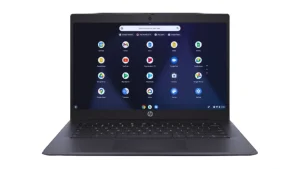
3. HP Chromebook 14
Simple, secure, and cloud-based. Great for Google Workspace or online classes.
- Processor: Intel N200
- RAM: 8GB
- Storage: 64GB eMMC
Best For: Students who live in Chrome apps.
4. ASUS Vivobook Go 15
Sleek design with surprisingly good performance for its price.
- Processor: Ryzen 3 7320U
- RAM: 8GB
- Storage: 128GB SSD
Best For: Students balancing work, study, and entertainment.
5. Dell Inspiron 15 3520 (Refurbished)
A great Windows laptop that often drops under $500 during promotions.
- Processor: Intel Core i5 (10th Gen)
- RAM: 8GB
- Storage: 256GB SSD
Best For: Heavy multitasking and long-term use.
Where to Find the Real Deals
- Amazon – frequent lightning deals on laptops and accessories.
- Best Buy – open-box items and student discounts.
- Walmart – seasonal rollbacks on HP, Acer, and Lenovo models.
- Dell Outlet – refurbished business laptops with warranty.
- Target and Costco – bundle offers and store coupons.
Refurbished Laptops, Smart or Risky?
Many students skip refurbished laptops, thinking they’re secondhand junk. That’s not true. Refurbished means the laptop was returned, inspected, cleaned, and certified again. It often looks new and performs just as well. When you buy “Certified Refurbished” from brands like Amazon Renewed or Dell Outlet, you usually get:
- Lower price (20–40% off).
- New battery or parts replaced.
- Warranty coverage (90 days to 1 year).
That’s smart value for any student who prefers performance over shiny packaging.
Windows vs. Chromebook: Which One Wins?
Windows Laptops:
- Better for Microsoft Office, coding, or multitasking.
- Can run software like Photoshop or AutoCAD.
- More flexible, but slightly heavier on the budget and battery.
Chromebooks:
- Simpler, faster, and more secure.
- Depend on the internet and Google Drive.
- Great for note-taking, browsing, and writing papers.
Accessories Worth Adding
- Wireless mouse – improves comfort.
- Laptop sleeve – protects from scratches.
- External hard drive – for backups.
- USB hub – more ports for accessories.
- Laptop stand – better posture during study sessions.
When to Buy for the Lowest Prices
- Back-to-school season (July–September) – Best for new student discounts.
- Black Friday & Cyber Monday – Major laptop price drops.
- Prime Day (July) – Amazon exclusives under $500.
- End-of-year clearance (December) – Old models discounted before new releases.
Simple Buying Checklist
Does it have 8GB RAM?
SSD, not HDD?
At least 8 hours of battery life?
Warranty included?
Real reviews (not generic)?.
Common Mistakes Students Make
- Buying based on looks, not specs.
- Ignoring RAM and storage limits.
- Forgetting warranty coverage.
- Buying at full price, without checking for coupons.
Battery Life Reality Check
Manufacturers love to advertise “up to 12 hours.” Real usage? Usually 7–8 hours with Wi-Fi on and screen brightness up. If your classes run long, carry a small power bank that supports USB-C laptop charging; it’s a game-changer.
Why These Deals Matter
For many students, $500 is a serious investment. These affordable laptops mean you can study, create, and connect without debt.
That’s what makes the student laptop deal under 500 USA not just a discount, but a doorway to opportunity.
Some FAQs
Q1. Are laptops under $500 good for college students?
Yes. For tasks like research, writing, and browsing, they work perfectly. Just avoid heavy gaming or 3D design on these models.
Q2. Is a Chromebook enough for university work?
Absolutely. If your coursework uses Google Workspace or web tools, Chromebooks are light, secure, and budget-friendly.
Q3. Can I upgrade RAM or storage later?
Some models allow it, but not all. Always check the specs before buying if you plan to upgrade later.
Buying a laptop on a budget doesn’t mean settling. It means making smart choices, finding a balance between price and performance. If you’re hunting for your next laptop, check today’s deals before spending extra.
You might find your perfect study partner for half the cost. Because at the end of the day, it’s not about owning the flashiest tech, it’s about having the right tool to build your future.



