Let’s be honest, iPads are great, but not everyone wants to spend $500 or more. Many small business owners, students, and casual users just need something affordable that handles emails, streaming, and daily tasks smoothly.
That’s where cheap iPad alternatives come in. You can find Android and Windows tablets that cost less but still offer speed, storage, and battery life good enough for work and play.
I’ve seen small business owners buy tablets under $200 and use them daily for inventory, design previews, or customer notes, no complaints at all. Pretty cool, right? Let’s explore the best deals and smart picks.
Top Cheap iPad Alternatives in the USA
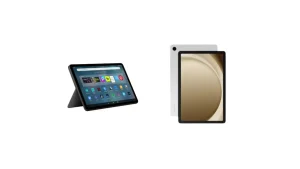
1. Samsung Galaxy Tab A9+
This one’s a favorite. It’s fast, sleek, and feels premium for the price. The Tab A9+ gives you:
- A bright 11-inch display
- Smooth multitasking
- 6GB RAM (great for apps and split-screen use)
- Around $220–$250 price range
You can run Zoom calls, edit docs, and stream movies without lag. For most people, this tablet gives iPad vibes without breaking the wallet. If you pair it with a Bluetooth keyboard, it can easily replace a laptop for light work.
2. Amazon Fire Max 11
Amazon nailed this one. The Fire Max 11 feels more serious than older Fire models. It’s built with aluminum, looks modern, and runs apps smoothly. Specs to love:
- 11-inch display
- Up to 14 hours battery life
- Stylus and keyboard support
- Price: around $230–$270
Sure, it runs on Fire OS, not pure Android, but you can still access most popular apps. It’s great for Netflix, Kindle books, or basic productivity work. For small shops or online sellers, it’s a smart and affordable device.
3. Lenovo Tab M10 Plus (3rd Gen)
Lenovo deserves more love in the tablet world. Their M10 Plus model offers solid performance and a nice balance between work and entertainment. Highlights:
- 10.6-inch 2K screen
- 4GB RAM, 64GB storage
- Lightweight build
- Priced around $180–$220
It’s perfect for reading, light design work, or managing business emails. Many freelancers I know prefer this one because it feels comfortable in hand during long hours.
4. OnePlus Pad Go
If you want a beautiful screen and strong battery at a mid-range price, this tablet wins. Why it’s worth checking:
- 11.3-inch 2.4K display
- Big 8000mAh battery
- Fast 67W charging
- Price: roughly $300
The design looks high-end, and the display quality is close to iPad level. It’s ideal for presentations, content creation, or binge-watching.
5. Microsoft Surface Go 3
Want a Windows tablet that feels like a mini laptop? The Surface Go 3 is still one of the best deals around. You get full Windows 11, which means you can use desktop software like Excel, Photoshop, or your POS system. Specs snapshot:
- 10.5-inch touchscreen
- Intel Pentium or i3 processor
- Optional keyboard and stylus
- Price: $350–$400
For small business owners who live inside Office apps, this tablet makes sense. It’s compact yet powerful enough for daily tasks.
6. Xiaomi Pad 6
Xiaomi makes fantastic budget tech, and the Pad 6 is no exception. You’ll get:
- 11-inch 144Hz display
- Snapdragon 870 processor
- Up to 8GB RAM
- Price: around $330–$360
It feels as smooth as tablets twice its price. The refresh rate makes scrolling and gaming super satisfying. If you need speed and value, this one’s a strong contender.
7. TCL TABMAX 10.4
Not a big name in tablets, but surprisingly good for the cost.
- 10.4-inch display
- Stylus included
- 8000mAh battery
- Price: around $170–$200
It’s great for drawing, note-taking, and simple daily tasks. If you’re running a small creative business, this one can handle sketching or basic design previews.
How to Choose the Right Tablet for You
Picking a cheap iPad alternative isn’t just about price. You should match it to your lifestyle or business need. Here’s how to decide smartly:
1. Check Your Use Case
- For studying or reading: Lenovo Tab M10 or Fire Max 11
- For work apps and typing: Samsung Tab A9+ or Surface Go 3
- For creative use: Xiaomi Pad 6 or TCL TabMax
2. Look at Performance
- Minimum: 4GB RAM
- Better: 6GB or more
3. Battery and Charging Speed
If you travel or work outdoors, battery life is a big deal. Aim for at least 10 hours of screen time and USB-C fast charging.
4. Storage Options
Choose 64GB or 128GB if you download a lot of files or apps. Bonus: look for microSD expansion, it saves you from storage headaches.
5. Accessory Support
A tablet with keyboard, pen, or case support saves you time later. Many cheap tablets now include these in bundle deals. Example: Amazon Fire Max 11 has a full keyboard case bundle that costs under $300.
Real-World Use Cases
Small Business Owners
- Customer sign-ins
- Digital menus
- Inventory tracking
- Email and invoices
Students and Freelancers
Students love the Lenovo M10 or Samsung A9+ for note-taking and research. Freelancers often prefer Xiaomi Pad 6 for design apps or social media management. It’s simple: if you can get your job done on a $250 tablet instead of a $700 iPad, why not save the cash?
Travelers and Remote Workers
If you’re often on the move, weight and battery life matter most. A lightweight tablet with strong standby time, like the Lenovo M10, works best. You can easily work, stream, or read on the go without worrying about power outlets.
Where to Find the Best Deals in the USA
- Amazon: frequent lightning deals
- Best Buy: open-box savings and bundle offers
- Walmart: budget-friendly exclusive models
- Target: regular tablet sales
- Manufacturer websites: Samsung, Lenovo, and Xiaomi offer student or trade-in discounts
Keep an eye during Black Friday, Cyber Monday, and Prime Day. Prices can drop 20–40%.
Pro tip: use tools like Honey or CamelCamelCamel to track price history before buying.
Accessories Worth Considering
- Keyboard case: turns it into a mini laptop
- Stylus: great for sketches or note-taking
- Screen protector: prevents scratches
- OTG adapter: connects USB drives or mouse
Honest Thoughts About Cheap Tablets
Not all budget tablets are perfect. Some have weaker cameras or fewer app updates. But if you choose wisely, you’ll rarely notice those trade-offs.
Here’s the truth: most people only use tablets for browsing, YouTube, social media, and light work. You don’t need Apple’s M-series chip for that. For the price of one iPad, you can buy two solid Android tablets and still have money left for accessories.
Best Overall Pick
If I had to choose one, I’d go for the Samsung Galaxy Tab A9+. It delivers:
- Smooth Android experience
- Great screen
- Reliable updates
- Long battery life
It feels close to iPad quality but keeps your wallet happy.
Smart Tip Before Buying
Always read recent user reviews on Amazon or Best Buy. Look for feedback after updates, sometimes a software patch fixes everything or breaks performance. Also, check if your model supports future Android versions. It ensures your tablet lasts longer.
Buying a tablet doesn’t have to hurt your budget. With so many reliable iPad alternatives in the USA, you can get performance, design, and comfort without overspending. From Samsung’s all-rounder Tab A9+ to Lenovo’s student-friendly M10 and Amazon’s durable Fire Max 11, there’s an option for everyone.
Think about your needs, compare prices, and grab a deal that fits your life. A tablet should make work simpler, not more expensive. And today, that’s absolutely possible.



