Notion changed how people organize work. It’s flexible, minimal, and feels like a mix of notes, tasks, and databases all in one clean workspace. But sometimes, Notion feels heavy. It requires an internet connection to sync, loads slowly on some devices, and can become confusing when you just want a simple list done.
If you’ve ever thought, “I love Notion, but I wish it were faster,” this guide is for you. Whether you’re a student trying to manage study notes or a team leader organizing projects, there are plenty of apps that offer the same clarity and structure, sometimes even better. Let’s explore the top apps like Notion for students and project management that you can start using today.
Why Look for Notion Alternatives
- It needs a constant internet connection.
- Big pages load slowly.
- The mobile app feels limited.
- Collaboration can be confusing for new users.
Trello — Visual Project Management for Everyone
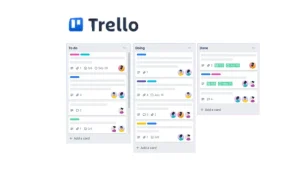
Trello uses a card-and-board layout that feels natural. You can drag and drop tasks like sticky notes on a wall.
Why students and teams love it
- Super simple to start.
- Great for group projects and shared workspaces.
- Integrates with Google Drive, Slack, and more.
When it works best
Trello shines when you want to track progress visually. If you’re a student managing multiple assignments or a startup founder juggling clients, Trello makes it easy to see everything at a glance.
Weak spots
It’s not great for detailed note-taking or databases. But for visual organization, Trello is unbeatable in simplicity.
ClickUp — The All-in-One Productivity Hub
ClickUp feels like Notion’s faster, more structured cousin. It packs tasks, goals, and documents in one clean interface.
Why it’s great
- Built-in docs and task tracking.
- Goal-setting and reminders for teams.
- Time tracking and dashboards.
Why it’s ideal for project management
You can assign deadlines, track performance, and organize workflows without switching tabs. Startups love how flexible it is, it can grow with your team.
What’s not perfect
It can feel overwhelming at first. There are so many options that beginners might need a few days to adjust.
Evernote — The Classic Note Organizer
Evernote has been around since the early days of digital productivity. It’s perfect for people who love writing detailed notes.
Why it still matters
- Smooth note-taking and tagging system.
- Document scanning is built in.
- Works offline with strong sync options.
Why students like it
You can organize class notes, attach PDFs, and record audio during lectures. Everything stays searchable.
What could improve
Collaboration is limited compared to Notion or ClickUp. But for solo learners or writers, Evernote stays reliable and fast.
Coda — The Database Powerhouse
Coda takes Notion’s concept and adds automation. Think of it as a mix of a spreadsheet and a document in one app.
Why it stands out
- Automations called “Packs” connect with apps like Slack and Gmail.
- Custom templates for project tracking.
- Real-time collaboration with a spreadsheet-like feel.
Ideal for
Teams that love numbers, data tracking, and workflow automation. Coda turns any page into a smart system.
What’s tricky
The setup takes time. But once you learn the basics, it’s one of the most flexible tools around.
Microsoft OneNote — Familiar, Simple, and Offline
If you already use Microsoft tools, OneNote fits perfectly. It’s reliable and works even when your internet doesn’t.
Why it’s useful
- Excellent for handwritten notes with a stylus.
- Full integration with Word, Excel, and Teams.
- Great offline access.
Best for students
It feels like a real notebook. You can organize sections for each subject and add images, sketches, or formulas easily.
Downsides
It lacks advanced project tools. But for clean note organization, OneNote is hard to beat.
Airtable — For Data-Driven Projects
Airtable combines a spreadsheet with a database. It’s perfect for managing tasks, inventory, or even event planning.
Why teams love it
- Visual layouts: grid, gallery, kanban, calendar.
- Real-time collaboration.
- Easy to link related tasks.
Perfect for
Small businesses and startups that track multiple moving parts. It helps keep everything structured and clear.
What’s challenging
Takes a bit of learning. But once you get used to it, Airtable feels powerful and clean.
Todoist — The Personal Task Master
Todoist focuses purely on tasks. It’s fast, minimal, and easy to use on any device.
Why do people use it daily
- Natural language input (“Finish blog post tomorrow”).
- Priorities and recurring tasks.
- Integration with calendars and browsers.
For students
Great for managing homework, exams, and personal reminders.
For project managers
Perfect for quick personal task lists that connect with bigger team tools.
Asana — The Collaboration Hero
Asana helps teams plan, track, and deliver work together. It’s like having a digital office board where everyone knows what’s happening.
Why it’s great for startups
- Task assignments with progress tracking.
- Clean dashboards for team overviews.
- Integration with Google Workspace and Slack.
Why students love it
Group projects become less messy. Everyone can see who’s responsible for what and when.
Drawbacks
It’s less flexible for personal notes, but it’s great for organized teamwork.
Google Keep — Simple Notes That Sync Instantly
Google Keep is the most lightweight option on this list. It’s for quick thoughts, checklists, or ideas that hit you while commuting.
Why do people love it
- Instant sync with Google account.
- Color-coded notes and voice memos.
- Easy sharing with classmates or team members.
Ideal use
Quick brainstorming, to-do lists, and short reminders.
What’s missing
No deep project structure or advanced tags. But for simple notes, nothing beats its speed.
ProofHub — The Team Organizer
ProofHub feels like a modern control center for small teams. It keeps projects, deadlines, and communication in one dashboard.
Why it’s useful
- Built-in chat and file sharing.
- Gantt charts and time tracking.
- Simplified task visibility for everyone.
For students
Group assignments become less chaotic with built-in collaboration tools.
For managers
Everything stays clear, who’s doing what, and when it’s due.
Obsidian — The Knowledge Builder
Obsidian focuses on connecting ideas, not just storing them. It’s great for deep thinkers and writers who want their notes to form a web of connections.
Why it different
- Local storage, no cloud dependency.
- Markdown format for fast writing.
- Visual “graph view” to connect related ideas.
For students
Perfect for research projects and building long-term study notes.
For teams
Better for individuals than large groups, but excellent for personal growth.
Quire — Lightweight Collaboration Tool
Quire keeps everything focused and uncluttered. It uses nested task lists, which makes breaking down projects easy.
Why do people like it
- Clean design without distractions.
- Easy hierarchy for subtasks.
- Smooth real-time updates.
Ideal for
Teams that prefer simplicity over complex dashboards.
Downsides
Few advanced integrations, but perfect for straightforward project tracking.
Which App Fits You Best
Let’s break it down by use case.
| Type of User | Best Option |
|---|---|
| Students managing notes | OneNote, Evernote, Google Keep |
| Small business teams | ClickUp, ProofHub, Asana |
| Visual thinkers | Trello, Coda, Airtable |
| Deep note writers | Obsidian, Notion |
| Quick personal organizers | Todoist, Google Keep |
| Data-heavy projects | Coda, Airtable |
Each app has its own personality. Some love visuals, others love structure. The right one depends on how your brain likes to work.
Quick Tips to Stay Organized
- Keep one main tool for long-term planning.
- Use color codes or tags for quick scanning.
- Don’t build too many systems — keep it simple.
- Back up your data regularly.
The real trick isn’t the tool. It’s how consistently you use it.
Notion started a productivity revolution, but it’s not the only great option out there. Apps like ClickUp, Trello, or Coda offer the same control with their own twists. If you’re a student, a freelancer, or running a small team, you’ll find something that fits how you think and work.
Try one for a week. See how it feels. The right app should make planning feel natural, not forced. Once you find that flow, managing projects or studies becomes less stressful and more progress. Because at the end of the day, the best productivity app is the one you’ll actually open tomorrow.



