When people hear “cheap,” they often think “low quality.” But when it comes to mechanical keyboards, that’s not always true. Over the last few years, brands have realized that not everyone wants to spend $150 just to type emails or game on weekends.
Mechanical keyboards under $50 now come packed with real mechanical switches, solid build quality, and even RGB lighting that used to be exclusive to premium models. You can actually get a keyboard that feels premium without paying a premium price, pretty wild, right?
If you’re a student, a gamer on a budget, or just someone who loves that satisfying “click” sound while typing, you’ll love what’s available today in the USA for under fifty bucks.
What Makes a Keyboard “Mechanical”?
Before jumping into recommendations, let’s clear one thing up. Many “cheap” keyboards are membrane style, they use rubber domes under the keys. Mechanical keyboards, on the other hand, use individual switches for each key. Here’s what that means for you:
- Better typing feel: Each keypress feels crisp and tactile.
- Longer life: Most switches are rated for 50+ million presses.
- Custom feel: Some switches are quiet, others clicky, you get to choose.
- Faster response: Great for gamers who need that millisecond edge.
So when we say “mechanical keyboard under 50,” we’re talking about real mechanical switches, not cheap imitations.
Things to Look for Before Buying
When shopping in this price range, it’s easy to get fooled by flashy RGB lights or “gaming” labels. Instead, focus on these five essentials:
1. Switch Type
- Blue switches: Loud and clicky, fun to type on, great feedback.
- Red switches: Quiet and smooth, ideal for gaming.
- Brown switches: A middle ground, tactile but not too noisy.
2. Build Quality
- A metal top plate or reinforced plastic
- Stable keycaps (PBT > ABS)
- Detachable cable if possible
3. Layout
- Full-size (104 keys), includes number pad
- Tenkeyless (TKL), more compact, no number pad
- 60% layout, ultra-small, perfect for portability
4. Connectivity
Most sub-$50 models are wired, which is fine, no battery hassle, zero lag. But a few budget Bluetooth options are emerging too.
5. Extra Features
- Anti-ghosting (registers multiple keypresses)
- Hot-swappable switches
- Customizable lighting modes
- Detachable cable for easier storage
Best Cheap Mechanical Keyboards Under $50
1. Redragon K552 Kumara
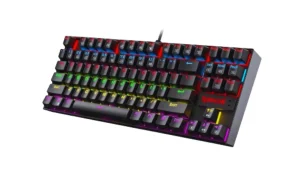
Price: Around $35–$40
Type: Tenkeyless (TKL)
Switches: Outemu Blue (clicky)
This one is a legend in the budget keyboard world. You’ll find it on almost every “best cheap mechanical keyboard” list, and for good reason. It feels solid, heavy enough not to slide around, and gives that classic click-clack sound that mechanical fans love.
You get RGB backlighting, metal top plate, and anti-ghosting on all keys. If you’re typing or gaming, it feels way more premium than its price suggests.
Pros:
- Durable build
- Great tactile feedback
- Vibrant lighting modes
Cons:
- A bit loud (not ideal for quiet offices)
- Non-detachable cable
Best For: Typists, gamers, anyone who loves that “clicky” sound.
2. Royal Kludge RK61
Price: Around $45
Type: 60% layout
Switches: Red, Brown, or Blue (your choice)
If you like a minimalist setup, the RK61 is perfect. It’s compact, no number pad, no wasted space. Yet it still feels premium, with hot-swappable switches and both wired + Bluetooth modes. That means you can use it on your laptop, tablet, or even your phone.
Pros:
- Wireless and wired connectivity
- Customizable switches
- Compact, modern look
Cons:
- Takes time to get used to smaller layout
- Battery life could be better
Best For: Students, freelancers, and digital nomads who want portability.
3. Keychron C3 Pro
Price: Around $49
Type: Tenkeyless
Switches: Red or Brown
Keychron is a trusted name among keyboard enthusiasts, and the C3 Pro brings that quality down to an affordable level. This model has QMK/VIA support, meaning you can customize keys, macros, and lighting easily. It’s a wired keyboard, but it feels like something that should cost twice as much.
Pros:
- Excellent typing feel
- Customizable via software
- Solid build quality
Cons:
- No wireless
- Simple design (no fancy RGB)
Best For: Professionals who want a reliable daily driver.
4. MageGee MK-Armor / Portable 60%
Price: $30–$40
Type: 60% or TKL
Switches: Blue or Red
MageGee has quietly become one of the best “underrated” brands in budget keyboards. Their boards look stylish, feel durable, and don’t feel cheap in the hand. If you just want something that works great out of the box, this is it.
Pros:
- Affordable and well-built
- Multiple layouts available
- Bright lighting options
Cons:
- Non-removable cable
- Not hot-swappable
Best For: Beginners or office setups on a budget.
5. Cooler Master Devastator 3 Combo
Price: Around $45 (keyboard + mouse!)
Type: Full-size
Switches: Mem-chanical (hybrid feel)
Technically, this isn’t a “true” mechanical keyboard, but it comes very close, and you get a gaming mouse with it. If you just want a solid, responsive combo, this is one of the best bang-for-buck deals.
Pros:
- Great for gaming
- Includes mouse
- Adjustable RGB
Cons:
- Hybrid switches (not pure mechanical)
- Slightly louder than expected
Best For: New gamers or office setups that need a full-size combo.
Bonus: Hidden Gems Under $50 Worth Checking Out
If you dig a little deeper on Amazon USA, you’ll also find:
- Velocifire TKL02: Great for quiet offices (Brown switches)
- Eagletec KG010: Feels premium, solid aluminum body
- AULA F2088: Full-size RGB with wrist rest
- NPET K10 Pro: Mem-chanical with smooth lighting
All of these deliver reliable performance for everyday use, without costing as much as your GPU.
Sound Test Matters (Seriously)
Before buying, check YouTube for a sound test of the model you like. Why? Because even a $40 keyboard can sound amazing or terrible depending on the switch and case. If you type a lot, you’ll thank yourself for picking the one that sounds right to your ears, not just looks good in pictures.
Quick Comparison Table
| Model | Price | Switch Type | Layout | Special Feature |
|---|---|---|---|---|
| Redragon K552 | ~$35 | Blue | TKL | RGB lighting |
| RK61 | ~$45 | Red/Brown/Blue | 60% | Wireless + wired |
| Keychron C3 Pro | ~$49 | Red/Brown | TKL | VIA customization |
| MageGee MK-Armor | ~$35 | Red/Blue | 60%/TKL | Multiple variants |
| Cooler Master Devastator 3 | ~$45 | Hybrid | Full-size | Keyboard + Mouse combo |
Small Tips to Make Your Keyboard Last Longer
A cheap keyboard doesn’t mean it won’t last, if you take care of it.
Clean Regularly
Use a soft brush or compressed air every few weeks. Dust kills switches faster than age.
Avoid Cable Stress
If the cable is fixed, don’t yank it. Wrap it loosely when packing.
Customize Keycaps
Even cheap boards can look premium with custom PBT keycaps, and they’re easy to replace.
Lubricate Switches
You can make any mechanical keyboard feel smoother with a $5 lube kit. It’s a small upgrade that feels huge in daily use.
You don’t need to spend $150 for that satisfying click or smooth keystroke. Today’s cheap mechanical keyboards under $50 in the USA offer real value, durable switches, solid builds, and satisfying performance for work, study, or gaming. If you want a reliable pick:
- Redragon K552 is unbeatable for typing.
- RK61 wins for portability.
- Keychron C3 Pro nails professional use.
Mechanical keyboards aren’t just about typing, they’re about feeling connected to what you do. Once you start using one, it’s hard to go back to anything else. And that’s the beauty of these budget gems, you get the joy of mechanical typing without spending a fortune.



